
Make an isometric game
The preset combines camera-relative player movement, following and zoom. The game owns its player entity and movement bounds. This example uses a visible solid marker in an empty eight-metre room; add navigation or physics when introducing obstacles. Q/E zoom the view.
Create an isometric game:
karty new --yes --template isometric my-game
cd my-game
karty dev
The starter pins the controllers-isometric plugin's archive and checksum in karty.toml. The first build restores its source under ignored .karty/packages/controllers-isometric/; keep the declaration in Git. For an existing project, run karty package import controllers-isometric@0.0.1; see reusable packages. Use the room and material files from one room; the isometric starter also supplies its player solid prefab in world.yaml.
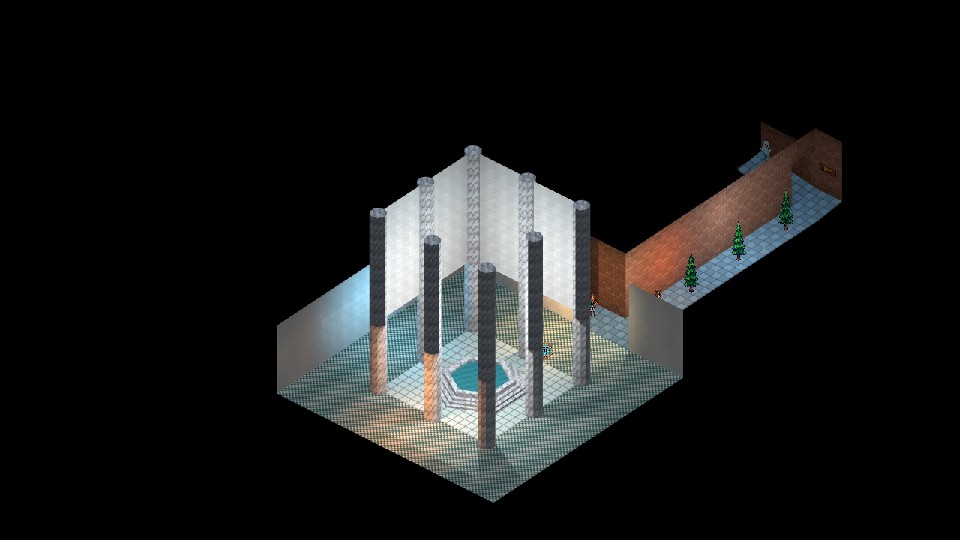
Connect the isometric preset
The complete src/main.go below connects the controller to your game. Change its module imports if your project has a different name. Keep the viewport and project resolution at 960 by 540. Constructors validate their options; Reset clears held controls when focus changes.
package main

import (
	"github.com/karty-game/controllers-isometric"

	"example.com/my-game/.karty/engine"
)

type Game struct {
	engine.Game
	request    engine.RequestID
	camera     *engine.Camera3D
	label      *engine.Text2D
	controller *controllers.Planar
	player     *engine.Solid3D
	focus      controllers.Vec2
	isoReady   bool
}

//go:wasmexport karty_register
func main() {
	controller, err := controllers.NewIsometric(controllers.DefaultIsometricOptions())
	if err != nil {
		panic(err)
	}
	game := &Game{controller: controller, focus: controllers.Vec2{X: 4, Y: 4}}
	engine.Run(engine.Hooks{
		OnUpdate:     func(engine.Frame) { game.updateIsometric() },
		OnKeyDown:    func(key engine.Key) { game.keyIsometric(key, true) },
		OnKeyUp:      func(key engine.Key) { game.keyIsometric(key, false) },
		OnInputReset: game.resetIsometric,

		OnStart: func() {
			game.label = game.NewText2D("Loading room...", engine.NewVec2(24, 24))
			game.request = game.RequestLevel("levels.room")
		},
		OnLevelReady: func(event engine.LevelReady) {
			if event.RequestID != game.request {
				return
			}
			options := game.controller.Options()
			position := game.controller.CameraPosition(game.focus)
			game.camera = game.NewCamera3D(event.Handle, engine.Camera3DSettings{
				Projection: engine.CameraProjectionIsometric,
				Output:     engine.CameraOutputFull,
				Position:   engine.NewVec3(float32(position.X), float32(position.Y), float32(position.Z)),
				Yaw:        float32(options.Yaw), Pitch: float32(options.Pitch),
				VerticalFOV: 1.05, OrthoHeight: float32(options.Zoom),
				NearClip: 0.05, FarClip: 100,
				ViewportWidth: 960, ViewportHeight: 540,
			})
			game.camera.SetLayer(-1)

			game.player = game.NewSolid3D(event.Handle, engine.NewTransform3D(engine.NewVec3(4, 4, 0)), engine.SolidRenderer{Prefab: "player"})

			game.isoReady = true

			game.label.SetText("WASD / arrows: move | Shift: run | Q/E: zoom")
		},
		OnLevelFailed: func(event engine.LevelFailed) {
			if event.RequestID == game.request {
				game.label.SetText(event.Diagnostic)
			}
		},
	})
}

func (game *Game) keyIsometric(key engine.Key, down bool) {
	if control, ok := movementKey(key); ok {
		game.controller.Key(control, down)
		return
	}
	if !down || game.camera == nil {
		return
	}
	factor := 1.0
	if key == engine.KeyQ {
		factor = 1.1
	}
	if key == engine.KeyE {
		factor = 1 / 1.1
	}
	if factor != 1 {
		settings := game.camera.Settings()
		settings.OrthoHeight = float32(game.controller.ZoomBy(factor))
		game.camera.SetSettings(settings)
	}
}

func (game *Game) resetIsometric() { game.controller.Reset() }

func (game *Game) updateIsometric() {
	if game.camera == nil || !game.isoReady {
		return
	}
	// Follow only the host-accepted actor position, never an unaccepted proposal.
	pose := game.player.Transform()
	accepted := controllers.Vec2{X: float64(pose.Position.X), Y: float64(pose.Position.Y)}
	delta := game.controller.Step(accepted)
	// This starter owns an empty 8m room; replace its bounds with navigation
	// or a physics body when adding obstacles, stairs or uneven terrain.
	x := max(.3, min(7.7, accepted.X+delta.X))
	y := max(.3, min(7.7, accepted.Y+delta.Y))
	if x != accepted.X || y != accepted.Y {
		pose.Position.X, pose.Position.Y = float32(x), float32(y)
		if err := game.player.Ref().SetPose(pose); err != nil { panic(err) }
	}
	game.focus = game.controller.Follow(game.focus, accepted, false)
	position := game.controller.CameraPosition(game.focus)
	settings := game.camera.Settings()
	settings.Position = engine.NewVec3(float32(position.X), float32(position.Y), float32(position.Z))
	game.camera.SetSettings(settings)
}

func movementKey(key engine.Key) (controllers.Control, bool) {
	switch key {
	case engine.KeyW:
		return controllers.Forward, true
	case engine.KeyS:
		return controllers.Backward, true
	case engine.KeyA:
		return controllers.Left, true
	case engine.KeyD:
		return controllers.Right, true
	case engine.KeyArrowUp:
		return controllers.ForwardAlt, true
	case engine.KeyArrowDown:
		return controllers.BackwardAlt, true
	case engine.KeyLeft:
		return controllers.LeftAlt, true
	case engine.KeyRight:
		return controllers.RightAlt, true
	case engine.KeyShiftLeft:
		return controllers.RunLeft, true
	case engine.KeyShiftRight:
		return controllers.RunRight, true
	}
	return 0, false
}
Step proposes movement from the accepted player position. Apply your game constraints; the engine refreshes the accepted pose automatically before the next update. WatchPose adds an optional notification. Follow takes that accepted position. The fixed diagonal camera keeps its angle as the player moves; ZoomBy clamps the visible world height.
Read .karty/packages/controllers-isometric/docs/presets-v1.md after restore for the complete contract, including picking and pointer targets. Extend the game with textures, prefabs, lighting and interactions, then share a build.
The interaction guide uses E by default. Use F for interactions here, or remap this starter's Q/E controls before wiring the interaction hook.