
Draw a 2D game
Use sprites for image artwork, vectors for shapes, and text for instructions and scores. This example draws all three and lets you collect a circle with keyboard movement.
Start with the 2d starter, which includes the controllers-topdown plugin:
karty new --yes --template 2d my-game
Keep the package's archive URL and checksum in karty.toml. The first build restores its source under ignored .karty/packages/controllers-topdown/. For an existing project, run karty package import controllers-topdown@0.0.1 first; see reusable packages.
Add a sprite
Create a project from the guide home. Download player.png and save it as assets/textures/player.png. The CLI imports that image and generates assets.TexturePlayer on the next build. Use the generated ID when creating the sprite.

Draw and play
Keep the project resolution at 960 by 540. Replace src/main.go with this scene. Change the imports if your project has a different name.
package main

import (
    "github.com/karty-game/controllers-topdown"
    "example.com/my-game/.karty/assets"
    "example.com/my-game/.karty/engine"
)

const speed = 180 // logical pixels per second

type Game struct {
    engine.Game
    player *engine.Sprite2D
    goal *engine.Shape2D
    label *engine.Text2D
    controller *controllers.Planar
    won bool
}

//go:wasmexport karty_register
func main() {
    options := controllers.DefaultTopDown2DOptions()
    options.Speed, options.RunSpeed = speed, speed
    controller, err := controllers.NewTopDown2D(options)
    if err != nil { panic(err) }
    game := &Game{controller: controller}
    engine.Run(engine.Hooks{
        OnStart: game.start,
        OnUpdate: game.update,
        OnKeyDown: func(key engine.Key) { game.key(key, true) },
        OnKeyUp: func(key engine.Key) { game.key(key, false) },
        OnInputReset: game.controller.Reset,
    })
}

func (game *Game) start() {
    // Draw the background behind the sprite, goal, and text.
    background := game.NewShape2D(engine.Rectangle(960, 540), engine.NewVec2(0, 0))
    background.SetFill(engine.RGBA(12, 21, 35, 255))
    background.SetLayer(-1)
    game.player = game.NewSprite2D(assets.TexturePlayer, engine.NewVec2(160, 280))
    game.goal = game.NewShape2D(engine.Circle(18), engine.NewVec2(760, 350))
    game.goal.SetFill(engine.RGBA(255, 200, 99, 255))
    game.label = game.NewText2D("WASD / arrows: collect the gold circle", engine.NewVec2(32, 24))
    game.label.SetFontSize(20)
    game.label.SetLayer(1)
}

func (game *Game) key(key engine.Key, down bool) {
    if key == engine.KeyR && down {
        game.controller.Reset()
        game.won = false
        game.player.Translate(160-game.player.Position().X, 280-game.player.Position().Y)
        game.goal.SetAlpha(1)
        game.label.SetText("WASD / arrows: collect the gold circle")
    }
    if control, ok := movementKey(key); ok { game.controller.Key(control, down) }
}

func (game *Game) update(engine.Frame) {
    if game.won { return }
    delta := game.controller.Step(controllers.Vec2{X: float64(game.player.Position().X), Y: float64(game.player.Position().Y)})
    dx, dy := float32(delta.X), float32(delta.Y)
    if dx != 0 || dy != 0 {
        x := min(max(game.player.Position().X+dx, 16), 944)
        y := min(max(game.player.Position().Y+dy, 80), 524)
        game.player.Translate(x-game.player.Position().X, y-game.player.Position().Y)
    }
    // Our game collects the goal within 32 pixels of its centre.
    dx = game.player.Position().X - game.goal.Position().X
    dy = game.player.Position().Y - game.goal.Position().Y
    if dx*dx + dy*dy < 32*32 {
        game.won = true
        game.goal.SetAlpha(0)
        game.label.SetText("Collected! Press R to restart")
    }
}
func movementKey(key engine.Key) (controllers.Control, bool) {
	switch key {
	case engine.KeyW: return controllers.Forward, true
	case engine.KeyS: return controllers.Backward, true
	case engine.KeyA: return controllers.Left, true
	case engine.KeyD: return controllers.Right, true
	case engine.KeyArrowUp: return controllers.ForwardAlt, true
	case engine.KeyArrowDown: return controllers.BackwardAlt, true
	case engine.KeyLeft: return controllers.LeftAlt, true
	case engine.KeyRight: return controllers.RightAlt, true
	case engine.KeyShiftLeft: return controllers.RunLeft, true
	case engine.KeyShiftRight: return controllers.RunRight, true
	}
	return 0, false
}
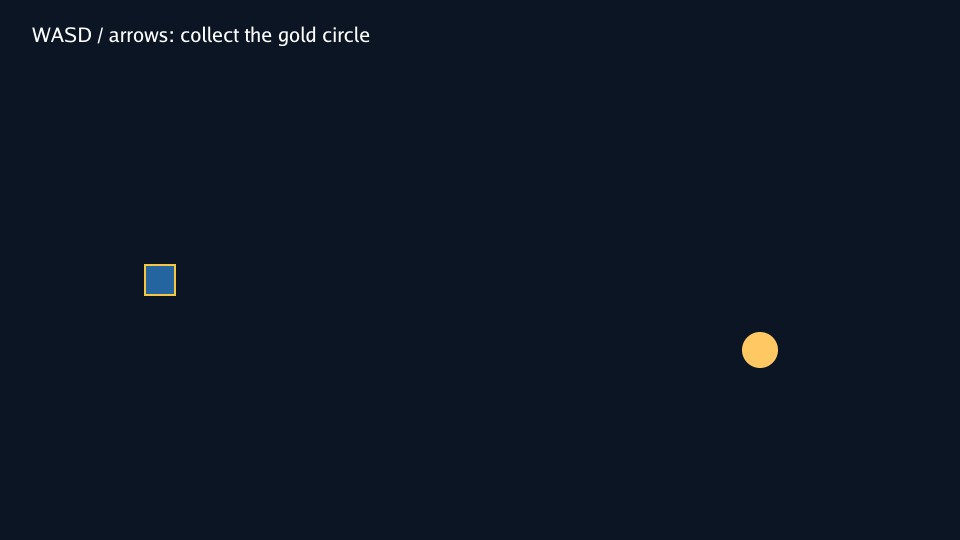
Run karty dev. Move with WASD or the arrow keys, reach the circle, then press R to try again. OnInputReset clears held keys when the game loses focus. The preset normalizes diagonal input and converts speed = 180 pixels per second into three pixels per fixed 60 Hz update. Camera following, pointer targets and zoom are available on the same preset when your game needs them.
Change the drawing
Positions use canvas pixels. The upper left is (0, 0); X grows right and Y grows down. Sprite and circle positions mark their centres. Rectangle and text positions mark their upper-left corners.
NewSprite2D draws the imported image. NewShape2D draws the rectangle and circle without image files. NewText2D draws the instruction, and SetText changes it when the goal is collected. Higher layers draw above lower ones.
Try another PNG, change the circle's radius or color, or move the goal. Use setters such as Translate, SetFill, and SetText to update existing entities instead of creating them again each frame.
Add feedback and share
Sound and video add effects or music. Build and share packages your game for the browser or desktop.
KartUI is optional when you need menus or reusable screen layouts. Its components work with both 2D and 3D games.