
Asset pipeline
Keep the files you author. Let Karty build the files the host needs. A PNG, WAV, world YAML file or KartUI component is a source asset; the runtime loads the processed result.
Declarations give assets a place in the game
karty.toml declares project settings and assets. Each level's level.toml selects its world source and resources. Logical asset names connect those declarations to game code and authored content.
For example, a world material can start as surface.png. A level declares the texture and its processing profile, then refers to its name from world YAML. Moving the original image does not require changing every surface; update its source declaration instead.
Builds prepare runtime content
Karty provides processing profiles and prepares the required tools automatically. The CLI applies those profiles and authored overrides, validates the result, and caches it for later builds. Changing an input or processing recipe selects a new cached result.
Images become runtime textures. Audio is converted for effects or streaming. World sources become compiled geometry and resource descriptions. Material generation and offline light baking prepare work that would otherwise happen while the game runs. KartUI compiles authored components into the game's UI bindings and packaged presentation data.
Each asset follows the processing it needs. An interface image, a world material and a music track do not all use the same recipe.
Materialize turns colour into surface detail
A colour image tells the renderer what a wall looks like, but it does not describe which way its small ridges face or how shiny its surface is. Without that information, a painted brick pattern can still look flat when a light moves across it.
Materialize estimates those properties from your image. Karty uses it during world material builds so you can start with one texture and a preset, rather than authoring every map separately.
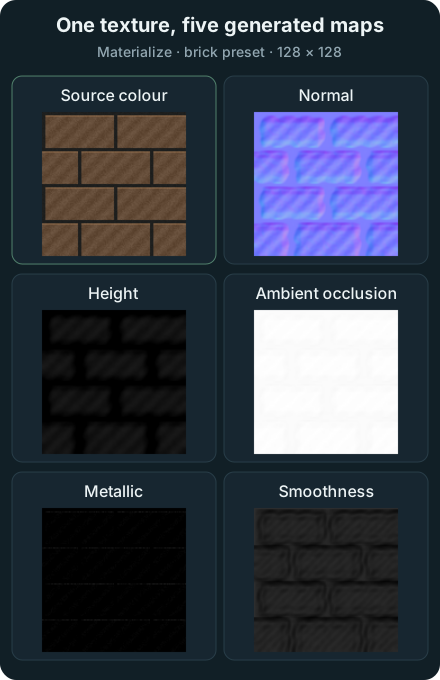
Scroll to see all columns.
| Map | What the host uses it for |
|---|---|
| Source colour, also called albedo | The painted colour of the surface |
| Normal | Changes the local lighting direction so ridges and recesses catch light differently |
| Height | Adds bounded, view-dependent relief to the texture |
| Ambient occlusion, or AO | Dims ambient light in estimated small crevices |
| Metallic | Controls the material's metallic reflectance |
| Smoothness | Controls how concentrated the reflected highlights appear |
These maps change shading; they do not add geometry, change the wall's silhouette or create collision.
Choose a material preset
For a world surface, declare the source and its Materialize preset in level.toml:
[[textures]]
name = "brick"
source = "brick.png"
profile = "environment"

[textures.materialize]
preset = "brick"
Then build through the CLI:
karty build --target web
Use a preset that matches the surface, such as brick, wood or metal. The image profile controls ordinary texture processing; the Materialize preset controls map generation. Both contribute to the processing recipe.
The generated maps are estimates, so review the result under the game's lighting. A dark painted mark or a shadow already in the source can be mistaken for a recess. A preset is a starting point, and a material named metal does not make painted areas physically metallic by itself.
Do the expensive work before the game runs
The world pipeline resizes each surface material to a 256-pixel tile. Before generating height, normal and AO, it converts that texture's own luminance to a neutral midpoint and a bounded contrast range. Covered pixels determine the range; transparent padding does not. Flat images remain flat, and near-flat images do not receive contrast amplification. This reduces the influence of paint brightness while retaining local differences, including extra details. It requires no knowledge of related textures. Albedo colors remain unchanged.
Materialize runs once for geometry maps and again on the original RGB for metallic and smoothness maps. Both passes are cached per source texture. The illustration above shows the original 128-pixel image and standalone native map outputs; the game build also performs normalization and packaging.
Karty validates the generated maps, packs their channels into material atlases, and builds smaller texture levels, called mipmaps, with borders that keep neighbouring materials from bleeding into each other. The host loads those prepared textures and samples them while drawing. It never runs Materialize on a player's machine.
World materials use the packaged atlas directly. The build omits their individual texture payloads when they have no separate sprite, animation, particle, vegetation or level UI use. This also avoids decoding those duplicate images and packing an unused sprite atlas at runtime. Textures outside the material atlas remain available as standalone level assets.
A cold build does more work. Later builds reuse maps whose source, preset, generation settings and tool identity still match. Changing one material regenerates that material and repacks the atlas; unchanged maps are reused. The separate textures.material_strengths settings adjust how strongly the host displays normal, height and AO effects while reusing the generated maps.
The texture guide covers presets and surface mapping. The generated .karty/docs/ reference lists the available material controls.
Generated files have separate homes
Scroll to see all columns.
| Location | Purpose | Keep in Git |
|---|---|---|
| Source folders and manifests | Go, KartUI, world sources, original media and configuration | Yes |
packages/ | Fixed package archives referenced by the project | Yes |
.karty/ | Generated bindings, installed package views, processing caches and game reference | No |
dist/ | Packaged output for the selected target | No |
Edit the original files and rebuild. A clean checkout can recreate generated output from the committed sources and declared dependencies. Linked package folders must also be available; use archives when you need a fixed copy.
Shipping includes more than the cartridge
game.kart carries the client and embedded content. Levels and streaming resources can live beside it. The native output includes its host; web output includes the launcher and either local runtime files or verified shared-runtime references, according to the build options.
Share the complete target directory so those pieces stay together. Follow Build and share for packaging commands, or Textures for a world material example. Your project's .karty/docs/ contains the full authoring reference.
Source formats and runtime data
TOML configures projects and tools; YAML describes worlds and prefabs. Importers may also consume editor formats such as Tiled JSON. Builds convert game data into bounded binary resources before cartridge compilation. Runtime game code uses the compiled records, with no general JSON, CSV, XML, gob or YAML/TOML decoder dependency. Development-server messages, source-package inventories, editor schemas and authoring reports remain tooling formats.
Karty packs game images and all remaining level images into build-time QOI atlas pages with a binary region layout (texture/atlas@1). Sprites, UI, animation, particles and vegetation keep stable logical references and original dimensions. Identical processed images share one rectangle; connected particle frames share one page. The verified cache includes source bytes, names, frame groups and packing revision. Reports count emitted page bytes and decoded memory once, and retain source records for inspection. Runtime loads the prepared pages and views; it does not rebuild these atlases.